System Design
This type of question is very common in DevOps interviews. You’re given a project and asked how you would deploy it. There is no perfect answer — what matters is the way you reason.
These exercises use services you may not have deployed in this course (ECS, SQS, Lambda, CloudFront…). That’s normal — these are thinking exercises, not hands-on practice. The goal is to train you to think about architecture.
The method — How to approach ANY system design question
Section titled “The method — How to approach ANY system design question”Before looking at the exercises, remember this method. It works for any prompt:
- Ask questions before answering — What budget? How many users? What team size? Is there existing infrastructure?
- Understand the business — Not all services are equal. The payment service going down = customers can’t buy = the company loses money in real time. The notification service going down = customers don’t get an email = not ideal but not critical. Always ask: “what is the most critical service for the business?”
- Identify the components — Frontend, backend, database, external services, background jobs…
- Identify the critical points — What absolutely must not break? What needs to scale? Which service has the most traffic?
- Propose a simple solution first, then evolve if the need demands it
- Justify every choice and mention the alternatives you didn’t choose
The trap to avoid: don’t over-engineer. The right answer is the one that fits the need, not the one that uses the most services. An EC2 with Docker Compose is a perfectly valid answer if the context calls for it.
How to use these exercises
Section titled “How to use these exercises”Don’t jump straight to the solution. The point is to think for yourself before looking at the answer. Here’s the order to follow:
- Read the prompt and write down your own questions — what information are you missing to propose a solution? Budget? Number of users? Team size? Write them down on paper or in your head before continuing
- Open “Questions to ask” — compare with yours. Did you find others? Good, that shows you’re thinking. Did you miss some? That’s normal, it comes with practice
- Open “Interviewer’s answers” — read the answers and think about how they guide your architecture
- Draw your architecture on paper or on excalidraw.com (a free online whiteboard). This is exactly what you’d do in an interview on a whiteboard. If you don’t know what to draw, here’s a simple example:
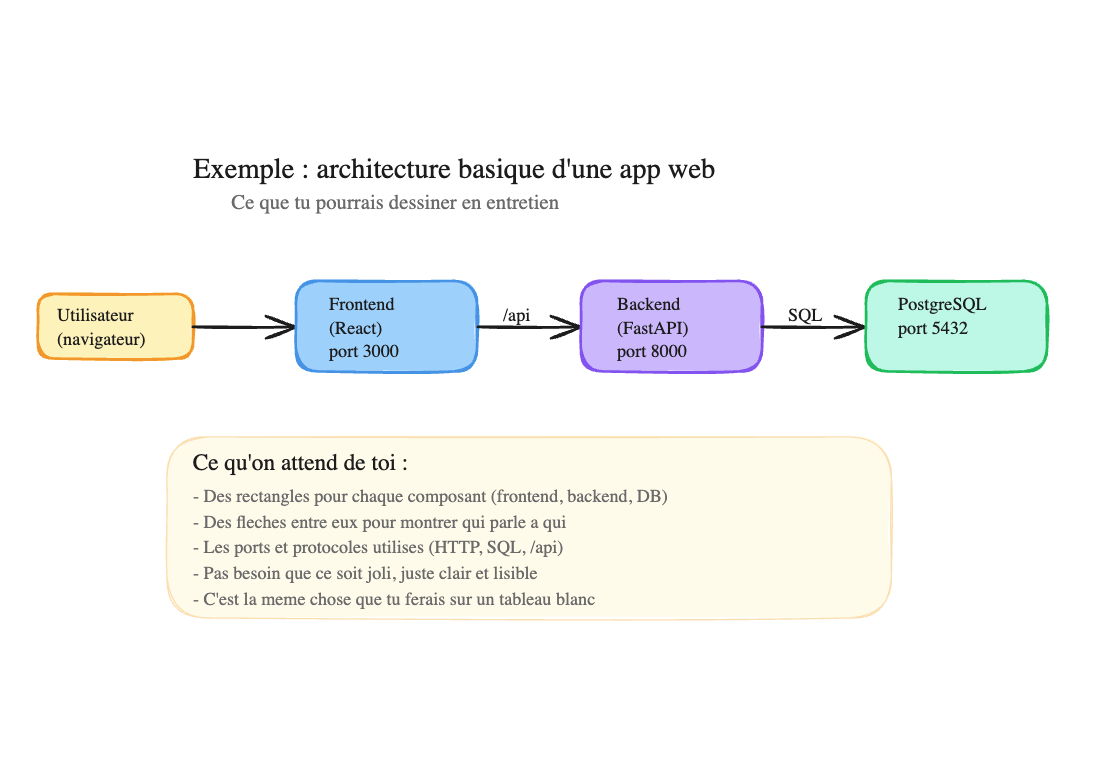
That’s all that’s expected: rectangles for each component, arrows to show who talks to whom, and the ports/protocols used. It doesn’t need to be pretty — just clear and readable. The colors in the image are just for readability here — in an interview or for this exercise, black and white boxes with text inside is already perfect.
- Open “Solution” — compare with your diagram. You don’t have the same answer? That’s fine — what matters is that you can justify your choices
Exercise 1 — The solo dev’s MVP
Section titled “Exercise 1 — The solo dev’s MVP”“A developer friend is launching a side project: a note-taking app (React frontend + Node.js API + PostgreSQL database). He’s alone, has $0 budget, and hopes to have about ten users at first. He asks you: how do I put this online?”
💡 Questions to ask
- Is it a side project or does he want to turn it into a business?
- Does he have a domain name?
- Does he already have an AWS account or does he prefer something simpler?
- Is it just to show the project (portfolio) or will there be real users?
🎙️ Interviewer's answers
“It’s a side project for now, but if it takes off he wants to make it a real product. No domain name yet. He doesn’t have an AWS account but he’s willing to create one. The goal is to have something online to show friends and potentially first users. Budget: $0.”
What this tells you:
- $0 budget → AWS Free Tier, no paid services
- Side project that could evolve → the solution should be simple but not throwaway
- No domain name → don’t bother with Route 53 for now, a public IP is enough
✅ Solution
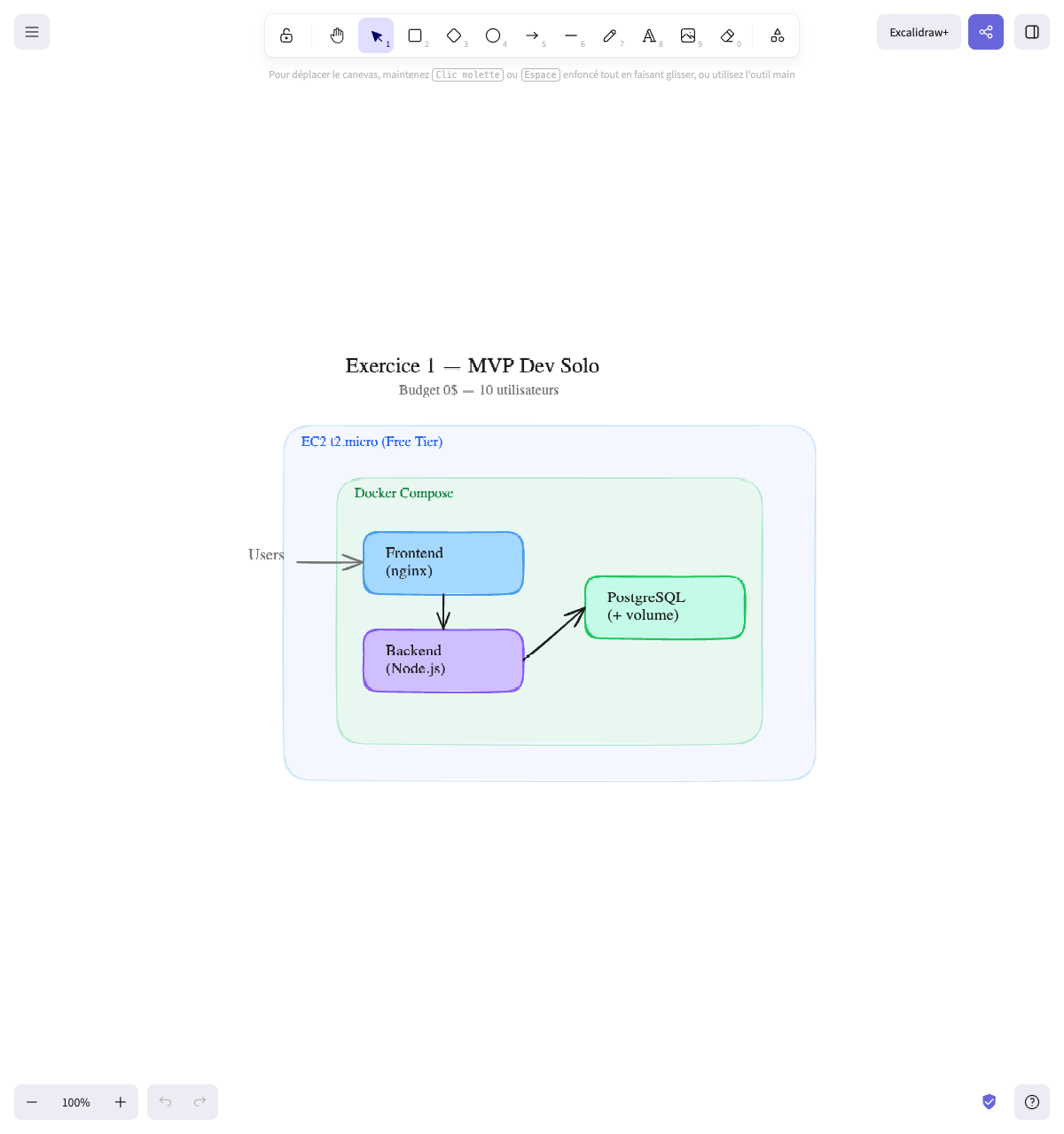
The architecture:
1 EC2 t3.micro (Free Tier)├── Docker Compose│ ├── Frontend (nginx)│ ├── Backend (Node.js)│ └── PostgreSQL (with volume)Why:
- 1 single EC2 with Docker Compose — 10 users, one dev, $0 budget. No need for more. The AWS Free Tier offers 750h/month of t3.micro, which is 1 instance 24/7 free for 12 months
- PostgreSQL in container with volume — no RDS (costs money beyond the Free Tier). For 10 users, PostgreSQL in Docker is more than enough. The volume persists the data
- Everything in one docker-compose.yml — one file, one
docker compose up, it’s deployed - Basic CI/CD — a GitHub Actions that builds and tests, deployment can be a simple
ssh + git pull + docker compose upfor now
Alternatives not chosen:
| Alternative | Why not |
|---|---|
| ECS Fargate | Overkill for 10 users. More complex to configure. Costs more than a Free Tier EC2 |
| Vercel/Netlify + Railway | Good alternative! Simpler than AWS. But the friend probably wants to learn AWS (more marketable on a resume) |
| RDS | The extra cost isn’t justified for a side project. If the DB crashes, restore from a Git/local backup |
| Lambda | The API runs continuously to serve users. Lambda would add unnecessary cold starts |
What the recruiter expects:
- That you DON’T suggest Kubernetes for a side project
- That you know the Free Tier and optimize for cost
- That you know a single EC2 with Docker Compose is a valid answer
Final diagram:
Exercise 2 — The scaling startup
Section titled “Exercise 2 — The scaling startup”“A startup is launching a food delivery app. They have a React frontend, a Python backend API, and a PostgreSQL database. Today they have 500 users, but they hope to reach 50,000 in 6 months. The API also receives Stripe payment webhooks that must never be lost. How would you deploy this on AWS?”
💡 Questions to ask
- What monthly budget? (an early-stage startup vs a startup with funding is not the same budget)
- What size DevOps team? (1 DevOps vs a team of 5)
- Is there existing infrastructure or are we starting from scratch?
- Is the traffic constant or are there spikes (lunch, dinner)?
🎙️ Interviewer's answers
“The startup raised 2M EUR 3 months ago. Infra budget: around 500 EUR/month, we can go higher if justified. There’s one DevOps (you) and 5 developers. No existing infrastructure, starting from scratch. Traffic has spikes at lunch and dinner (meal times), which makes sense. The critical point is really the Stripe webhooks — we’ve already lost payment confirmations and customers complained.”
What this tells you:
- Decent budget (500 EUR/month) → we can afford ECS Fargate + RDS, no need to stay on a single EC2
- 1 DevOps alone → the solution must be maintainable by one person (no Kubernetes)
- Lunch/dinner spikes → need for auto-scaling
- Lost webhooks = critical problem → must decouple with a message queue
✅ Solution
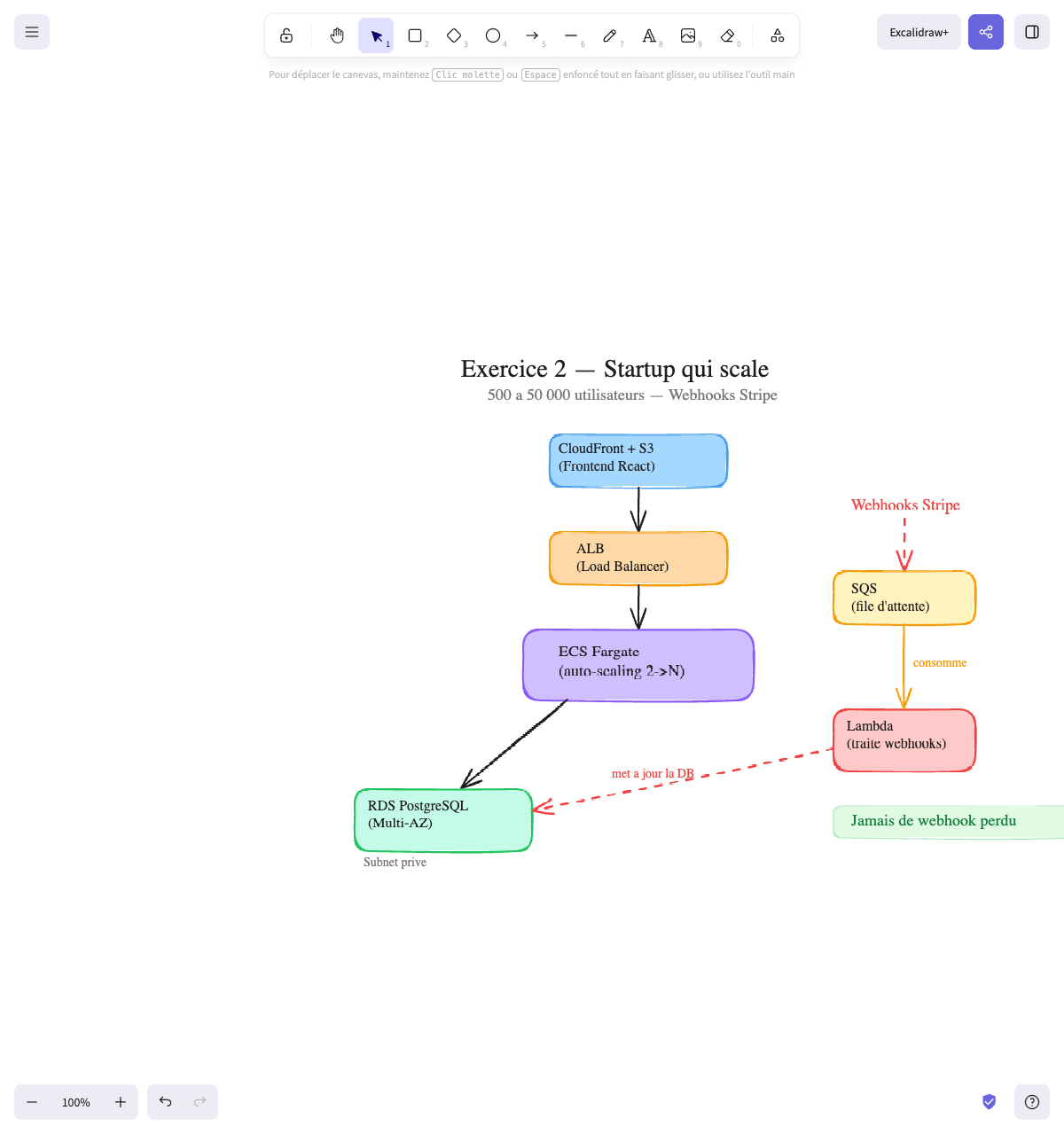
The architecture:
The main flow (left) and the webhooks flow (right) are separated:
Main flow:                                Webhooks flow:
CloudFront + S3 (frontend)                Stripe Webhooks        │                                       │ (arrive)        ▼                                       ▼    ALB (Load Balancer)                    SQS (queue)        │                                       │        ▼                                       │ consumes  ECS Fargate (2→N)                              ▼        │                                  Lambda (processes)        ▼                                       │  RDS PostgreSQL  ◄─── ─── ─── ─── ─── ─── ────┘  (Multi-AZ)              updates the DB
Why these choices:
| Component | Choice | Why |
|---|---|---|
| Frontend | S3 + CloudFront | The React frontend = static files. No need for a server. S3 hosts, CloudFront distributes worldwide (CDN) |
| Backend API | ECS Fargate | The API must scale from 500 to 50,000 users. Fargate automatically scales containers without managing servers |
| Database | RDS Multi-AZ | The data (users, orders, restaurants) is relational → PostgreSQL. Multi-AZ for high availability |
| Stripe Webhooks | SQS + Lambda | Webhooks arrive in SQS (queue). Lambda consumes the queue and processes the messages. If Lambda fails, the message stays in SQS and will be reprocessed. Nothing is lost |
| Load Balancer | ALB | Distributes traffic between ECS containers + automatic health check |
Alternatives not chosen:
| Alternative | Why not |
|---|---|
| Docker on an EC2 | Works for 500 users but doesn’t scale. At 50,000, you’d have to redo everything |
| EKS | More flexible but more complex and more expensive. No need for multi-cloud portability right now |
| Lambda for the API | Cold starts + continuous traffic = not ideal. ECS is more predictable |
| DynamoDB instead of RDS | Very relational data (users → orders → restaurants). SQL is more suitable here |
How to present it in an interview:
- “For 500 users, an EC2 with Docker Compose would be enough”
- “But since they’re targeting 50,000, I’d go directly with ECS Fargate”
- “The critical point is the Stripe webhooks — I’d put an SQS in front to never lose any”
Final diagram:
Exercise 3 — The e-commerce site and Black Friday
Section titled “Exercise 3 — The e-commerce site and Black Friday”“You work for a fashion e-commerce site. The site normally gets 5,000 visitors per day. But during Black Friday (3 days a year), traffic goes up to 200,000 visitors per day — 40 times more. Last year, the site went down during the spike. The CTO asks you to fix this for this year.”
💡 Questions to ask
- What’s the current architecture exactly? (how many servers, where’s the database, how is it deployed)
- What’s the budget for this migration?
- Can we have a maintenance window to migrate?
- Are the spikes only Black Friday or are there others (sales, Christmas)?
- What exactly broke last year? (the server, the database, the network?)
🎙️ Interviewer's answers
“Today we have 2 EC2s behind a load balancer, with PostgreSQL on a 3rd EC2 (not RDS). Deployment is SSH + git pull. Budget: no reasonable limit — last year’s Black Friday cost us 200k EUR in lost sales, so any investment is worthwhile. We can have a nighttime maintenance window. The spikes are Black Friday, summer and Christmas sales — so about 4 to 5 times a year. Last year, the database broke first (too many queries), then the 2 EC2s maxed out on CPU.”
What this tells you:
- The current infra is fragile: no auto-scaling, unmanaged database, manual deployment
- Unlimited (reasonable) budget → we can invest in real infrastructure
- The database broke first → need a cache in front and Read Replicas
- The EC2s maxed out → need auto-scaling
- 4-5 spikes per year → auto-scaling must be automatic, not a manual action for each spike
✅ Solution
The main problem: the site must handle 40x its normal traffic for a few days, then go back to normal. Paying for massive infrastructure 365 days for 3 days of spikes is waste. You need auto-scaling.
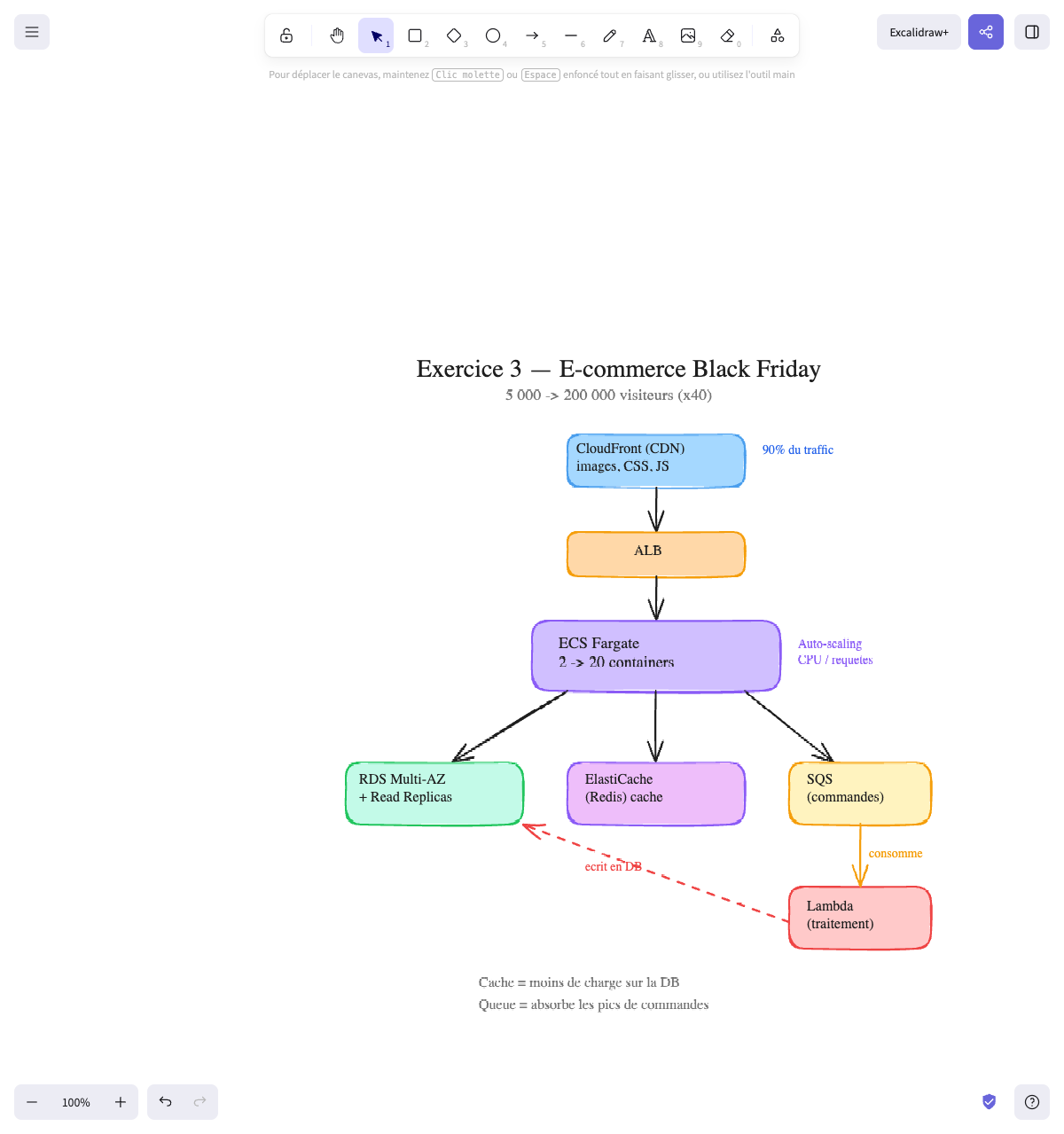
The architecture:
CloudFront (CDN) ← 90% of traffic (images, CSS, JS) │ ▼ ALB │ ▼ ECS Fargate (2→20 containers, auto-scaling) │ ├──────────────────┬──────────────────┐ ▼ ▼ ▼ RDS Multi-AZ ElastiCache SQS (orders) + Read Replicas (Redis) cache │ ▲ │ consumes │ ▼ └──── ─── ─── ─── ─── ──── Lambda (processing) writes to DBWhy these choices:
| Component | Choice | Why |
|---|---|---|
| CDN | CloudFront | Product images, CSS, JS represent 90% of requests. CloudFront caches them close to users. The server only sees dynamic requests (add to cart, payment) |
| Backend | ECS Fargate auto-scaling | 2 containers normally, scales up to 20 during Black Friday automatically (based on CPU or request count). After the spike, it scales back down |
| Cache | ElastiCache (Redis) | Product pages don’t change every second. We cache them. Instead of asking the database 200,000 times “give me product X”, the database answers once, Redis keeps the response cached |
| Orders | SQS → Lambda | During the spike, 1,000 people order at the same time. ECS puts orders in SQS (queue). Lambda consumes the queue and processes orders one by one, at its own pace, then writes to the database. The user sees “Order being processed” and receives a confirmation email |
| Database | RDS Multi-AZ + Read Replicas | The main database handles writes (orders via Lambda). Read Replicas handle reads (product catalog). This splits the load |
Alternatives not chosen:
| Alternative | Why not |
|---|---|
| Switching to a bigger EC2 during Black Friday | Vertical scaling = downtime to resize. And a single big server that crashes = everything goes down |
| DynamoDB instead of RDS | The product catalog has many relationships (categories, sizes, colors, stock per warehouse). SQL is more suitable |
| Everything in Lambda | Possible but DB connections from Lambda are complicated (need RDS Proxy). ECS is more suitable for a classic web site |
What the recruiter expects:
- You identify that the real problem is the spikes (not normal traffic)
- You propose auto-scaling, not just “a bigger server”
- You think about caching (CDN + Redis) to reduce the load
- You think about queues to absorb order spikes
Final diagram:
Exercise 4 — The company with 15 microservices
Section titled “Exercise 4 — The company with 15 microservices”“You join a 200-person company with 8 development teams. Each team maintains 1 to 3 microservices (15 total). Today each team deploys its services in its own way: some use EC2, others ECS, one guy even deployed directly on his machine. It’s chaos. The CTO asks you to unify the deployment.”
💡 Questions to ask
- Do all teams use Docker?
- Is there a common CI/CD or does each team have its own?
- Which cloud? All on AWS or multi-cloud?
- What’s the budget for the migration?
- How much time do we have to migrate?
- Do some services communicate with each other?
🎙️ Interviewer's answers
“Almost all teams use Docker, except one that still runs directly on an EC2 with a Python venv. There’s no common CI/CD — 3 teams use GitHub Actions, 2 use GitLab CI, and the others deploy manually. Everything is on AWS. The budget is comfortable, it’s an established company. We want to migrate progressively — no big bang, team by team, over 6 months. Yes, the services communicate a lot with each other: the order-service calls the payment-service, the notification-service listens to events from several other services.”
What this tells you:
- Almost everything in Docker → Kubernetes is a realistic option (no need to re-containerize everything)
- No common CI/CD → first step: standardize the pipeline
- All on AWS → no need for multi-cloud portability, but K8s is still a good choice for standardization
- Progressive migration → architecture that allows migrating service by service
- Services that communicate → need a service mesh or internal DNS (K8s handles this natively)
✅ Solution
The main problem: 15 services, 8 teams, zero standardization. The goal isn’t the perfect architecture, but a common platform that everyone uses.
The architecture:
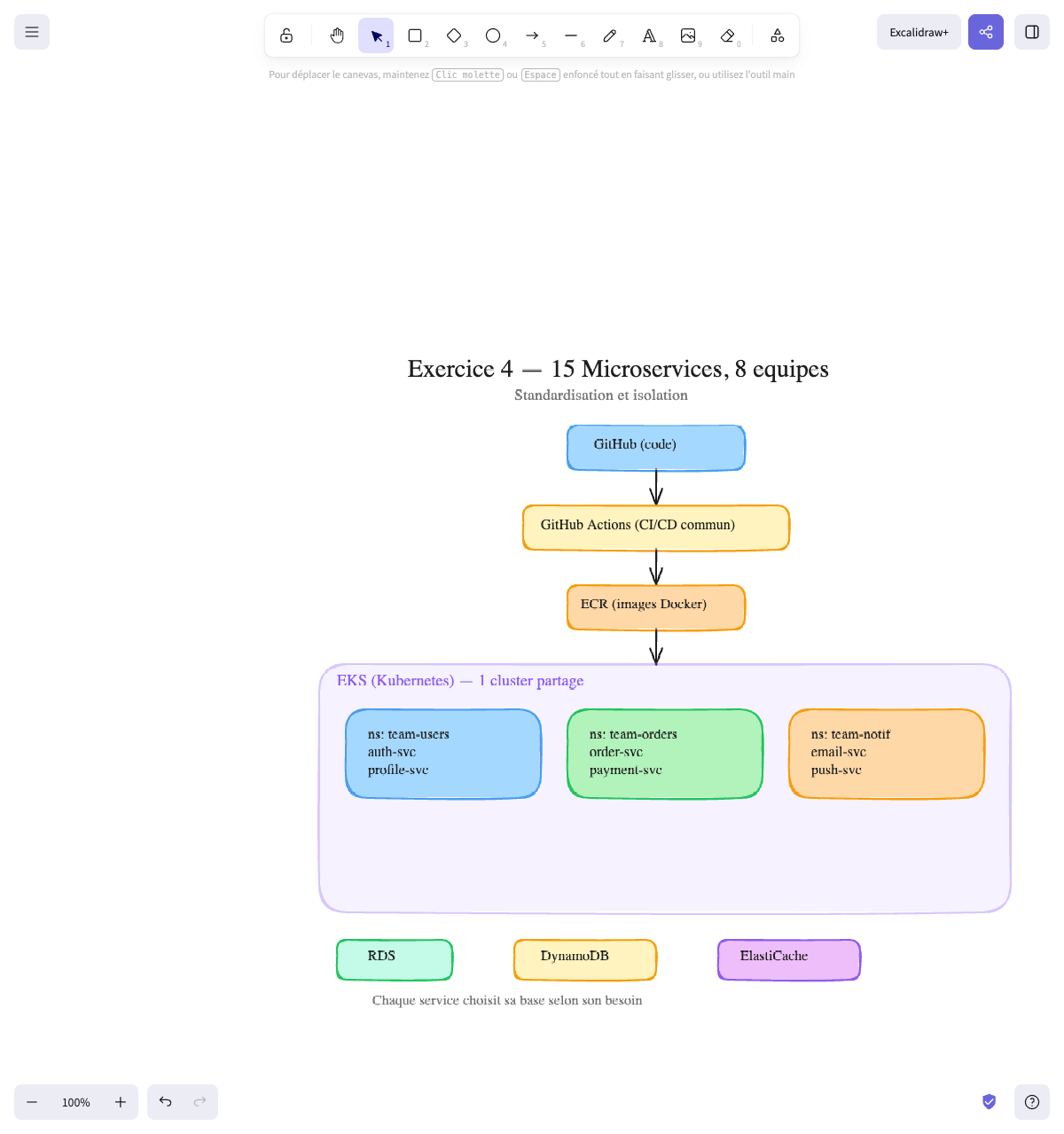
GitHub (each service's code) │ ┌──────────┴──────────┐ │ GitHub Actions │ ← Common CI/CD pipeline │ (per service) │ (lint → test → build → push image) └──────────┬──────────┘ │ ┌──────────┴──────────┐ │ ECR │ ← Docker image registry (1 repo per service) └──────────┬──────────┘ │ ┌──────────┴──────────┐ │ EKS (Kubernetes) │ ← One shared cluster, one namespace per team │ │ │ ┌────────────────┐ │ │ │ ns: team-users │ │ ← Users Team: auth-service, profile-service │ │ ns: team-orders│ │ ← Orders Team: order-service, payment-service │ │ ns: team-notif │ │ ← Notif Team: email-service, push-service │ │ ... │ │ │ └────────────────┘ │ └──────────┬──────────┘ │ ┌────────────────┼────────────────┐ │ │ │ ┌─────────┴──┐ ┌───────┴──────┐ ┌─────┴──────┐ │ RDS │ │ DynamoDB │ │ ElastiCache│ │ (some) │ │ (some) │ │ (Redis) │ └────────────┘ └──────────────┘ └────────────┘Why these choices:
| Component | Choice | Why |
|---|---|---|
| Orchestration | EKS (Kubernetes) | 15 microservices = need for orchestration. K8s is the standard for this. Each team has its namespace (its isolated space in the cluster) with its own services, resource quotas, and permissions |
| CI/CD | GitHub Actions + common template | A standard pipeline that each team minimally adapts. Same process: lint → test → build image → push to ECR → deploy on K8s |
| Registry | ECR | One Docker image repo per service. Integrated with AWS, no need to manage Docker Hub |
| Database | Mix RDS + DynamoDB | Each service chooses what suits it. The order service needs SQL → RDS. The session service needs speed → DynamoDB |
Why Kubernetes and not ECS here:
- 15 services, 8 teams → strong isolation needed (namespaces, quotas, RBAC)
- Teams must be able to deploy independently without breaking others
- K8s is a standard that developers know (or can learn once)
- Portability is a bonus if the company wants to change cloud someday
Alternatives not chosen:
| Alternative | Why not |
|---|---|
| ECS | Works but less isolation between teams. No native namespace concept. Harder to give each team its own space |
| One EC2 per service | 15 EC2s to maintain = operational nightmare. No standardization |
| Lambda for everything | Some services run continuously (API), others are event-driven. Lambda doesn’t suit all of them |
| One K8s cluster per team | 8 clusters = too expensive and too complex. A single cluster with namespaces is enough |
What the recruiter expects:
- You think about standardization (a common pipeline, a common platform)
- You don’t propose rewriting everything — you provide a framework within which teams migrate progressively
- You know that Kubernetes makes sense here (many services, need for isolation)
- You mention namespaces to isolate teams
Final diagram:
Exercise 5 — Processing uploaded files
Section titled “Exercise 5 — Processing uploaded files”“An accounting firm lets its clients upload invoices as PDFs. Each invoice must be: 1) stored, 2) converted to text (OCR), 3) the amounts must be extracted and saved to a database. The volume is very variable: sometimes 10 invoices per day, sometimes 5,000 (end of month). How would you architect this?”
💡 Questions to ask
- What’s the average PDF size?
- How long does OCR take per invoice?
- Does the user need the result immediately or can they wait a few minutes?
- Is the extracted data sensitive? (invoices = financial data)
🎙️ Interviewer's answers
“PDFs are between 100 KB and 5 MB. OCR takes about 10-30 seconds per invoice. No, the user doesn’t need the result in real time — they upload their invoices and come back later or receive an email when it’s ready. Yes, the data is sensitive — these are invoices with client names, amounts, SIRET numbers. We must be GDPR compliant.”
What this tells you:
- Files < 5 MB → well within Lambda limits (max 10 GB memory)
- OCR in 10-30 seconds → well below the Lambda limit (15 min). Perfect for serverless
- No real-time needed → can process asynchronously (queue)
- Sensitive data → S3 encryption, private VPC for the database, strict IAM, audit logs
✅ Solution
The main problem: the volume is very variable (10 to 5,000 per day). Paying for a 24/7 server to process 10 invoices is waste. But you need to handle 5,000 invoices at end of month. This is the perfect use case for serverless event-driven architecture.
The architecture:
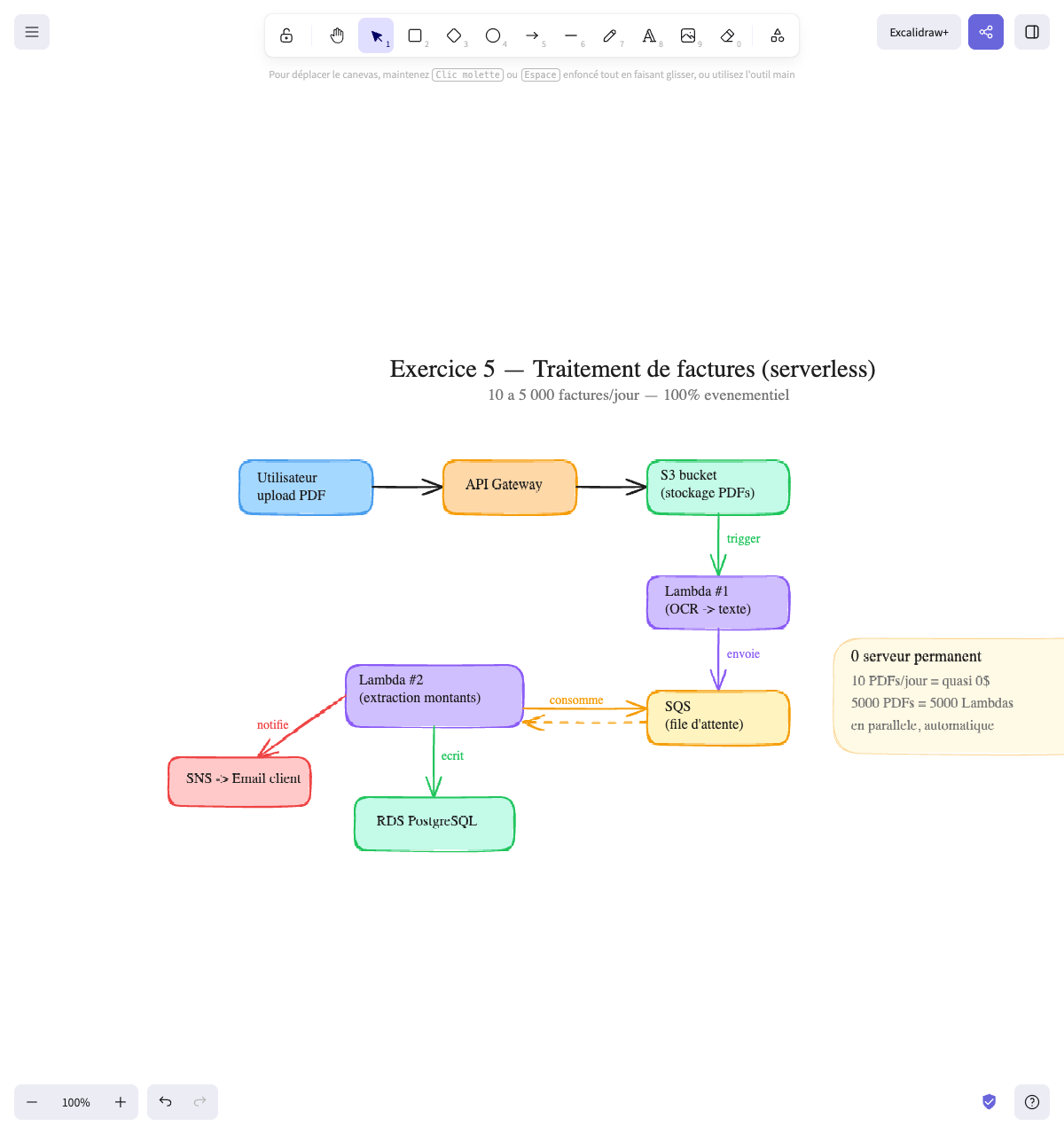
User → API Gateway → S3 bucket (PDF storage) │ │ auto trigger ▼ Lambda #1 (OCR → text) │ │ sends ▼ SQS (queue) │ ┌───────────────┘ │ consumes ▼ Lambda #2 (amount extraction) │ │ │ writes │ notifies ▼ ▼ RDS PostgreSQL SNS → Client emailLambda #2 consumes messages from SQS, extracts the amounts, writes to the database, and notifies the client via SNS. It’s Lambda #2 that does both actions — not RDS.
Why these choices:
| Component | Choice | Why |
|---|---|---|
| Upload | API Gateway + S3 | The user uploads directly to S3 (no need to go through a server). S3 can receive thousands of files in parallel |
| Storage | S3 | Unlimited storage, cheap, high durability. Original PDFs are preserved |
| OCR | Lambda #1 | Triggered automatically when a file arrives in S3. If 5,000 files arrive at the same time, AWS launches 5,000 Lambdas in parallel |
| Queue | SQS | Decouples OCR from extraction. If Lambda #2 fails, the message stays in the queue and will be reprocessed. Nothing is lost |
| Extraction | Lambda #2 | Consumes SQS, extracts amounts, writes to DB, and notifies the client via SNS |
| Database | RDS | Financial data is relational (client → invoices → line items → amounts). SQL is suitable |
| Notification | SNS | Called by Lambda #2 after processing — sends an email to the client |
The key point: event-driven architecture
No server runs permanently. Everything is triggered by events:
- A file arrives in S3 → triggers Lambda #1
- Lambda #1 sends the result to SQS
- Lambda #2 consumes SQS, writes to DB, and notifies via SNS
10 invoices/day = you pay almost nothing. 5,000 invoices/day = AWS launches 5,000 Lambdas, processes everything, and stops. You only pay for what’s used.
Alternatives not chosen:
| Alternative | Why not |
|---|---|
| EC2 with a worker that polls S3 | A 24/7 server for 10 invoices/day is waste. And you’d have to manage scaling manually for spikes |
| ECS with a queue | More control but more complexity and cost. Lambda is perfect here because each task is short (<5 min) and independent |
| Everything in a single Lambda | If OCR fails, you lose all the work. By separating OCR and extraction with SQS between them, each step can fail and be retried independently |
| DynamoDB instead of RDS | Financial data has relationships (client → invoices → line items). SQL with JOINs is more suitable for generating reports |
What the recruiter expects:
- You recognize this is an event-driven use case (not a classic API)
- You propose serverless (Lambda) because volume is variable
- You use SQS to never lose data
- You separate the steps so each part can fail and be retried independently
Final diagram:
BONUS — Fintech migration (senior level)
Section titled “BONUS — Fintech migration (senior level)”This exercise is above the level targeted by the course. You don’t need to know how to solve it for your first job. But reading it gives you a vision of what awaits you later and shows the type of thinking you’ll do as a senior DevOps. If you can talk about it in an interview, even partially, it’s a big plus.
“You join a fintech (250 people, 40 devs, 5 DevOps) that has 8 microservices. Everything runs on EC2s with manual deployments (SSH + git pull). The CTO wants to migrate to a containerized architecture on Kubernetes (EKS). The problem: some services are ultra-critical (payments), others much less so (internal reports). How do you organize the migration?”
The 8 services
Section titled “The 8 services”| Service | Criticality | Traffic | What it does |
|---|---|---|---|
| payment-service | Critical | High | Processes payments in real time. If it goes down, customers can’t pay |
| auth-service | Critical | High | Handles authentication. If it goes down, nobody can log in |
| api-gateway | Critical | Very high | Entry point for all requests. Routes to the right services |
| account-service | Medium | Medium | User account management (creation, modification) |
| notification-service | Low | Medium | Sends emails and push notifications |
| reporting-service | Low | Low | Generates internal reports for the finance team (1x per day) |
| kyc-service | Medium | Low | New customer identity verification (Know Your Customer) |
| admin-dashboard | Low | Very low | Internal dashboard for customer support |
💡 Hints
- You do NOT migrate everything at the same time. What do you start with?
- Think about risk: if the migration fails on the payment service, it’s catastrophic. If it fails on the admin dashboard… no big deal.
- You must be able to roll back at each step
- Think about running the old AND the new in parallel during the transition
- The CTO wants a plan — how many phases? How long?
🎙️ Interviewer's answers
“Budget is not a problem — it’s a fintech, we have investors. However, payments must NEVER go down — we have legal and regulatory obligations. We can tolerate a few minutes of downtime on internal services (admin, reports). The DevOps team is 5 people, we can’t do everything in parallel. We have about 3-4 months for the migration. No big bang — the CTO wants to migrate service by service. And we’re using EKS and not ECS because we have compliance requirements: audit logs, fine-grained access control per service, and potentially multi-cloud later.”
What this tells you:
- Unconstrained budget → EKS (~$75/month for the control plane) is acceptable
- Fintech + compliance → K8s is more suitable than ECS (RBAC, network policies, audit logs, portability)
- EKS = managed Kubernetes → AWS manages the control plane, the 5 DevOps manage the deployments
- Payments = untouchable → it’s the LAST service to migrate
- 5 DevOps → maximum 2-3 services migrated in parallel
- 3-4 months → ~2 weeks per service (including testing)
- No big bang → phased migration, service by service
✅ Solution
The key principle: migrate from least critical to most critical.
You start with the least risky services to refine the process (CI/CD, Dockerfiles, ECS config, monitoring). When everything is solid, you migrate the critical services with confidence.
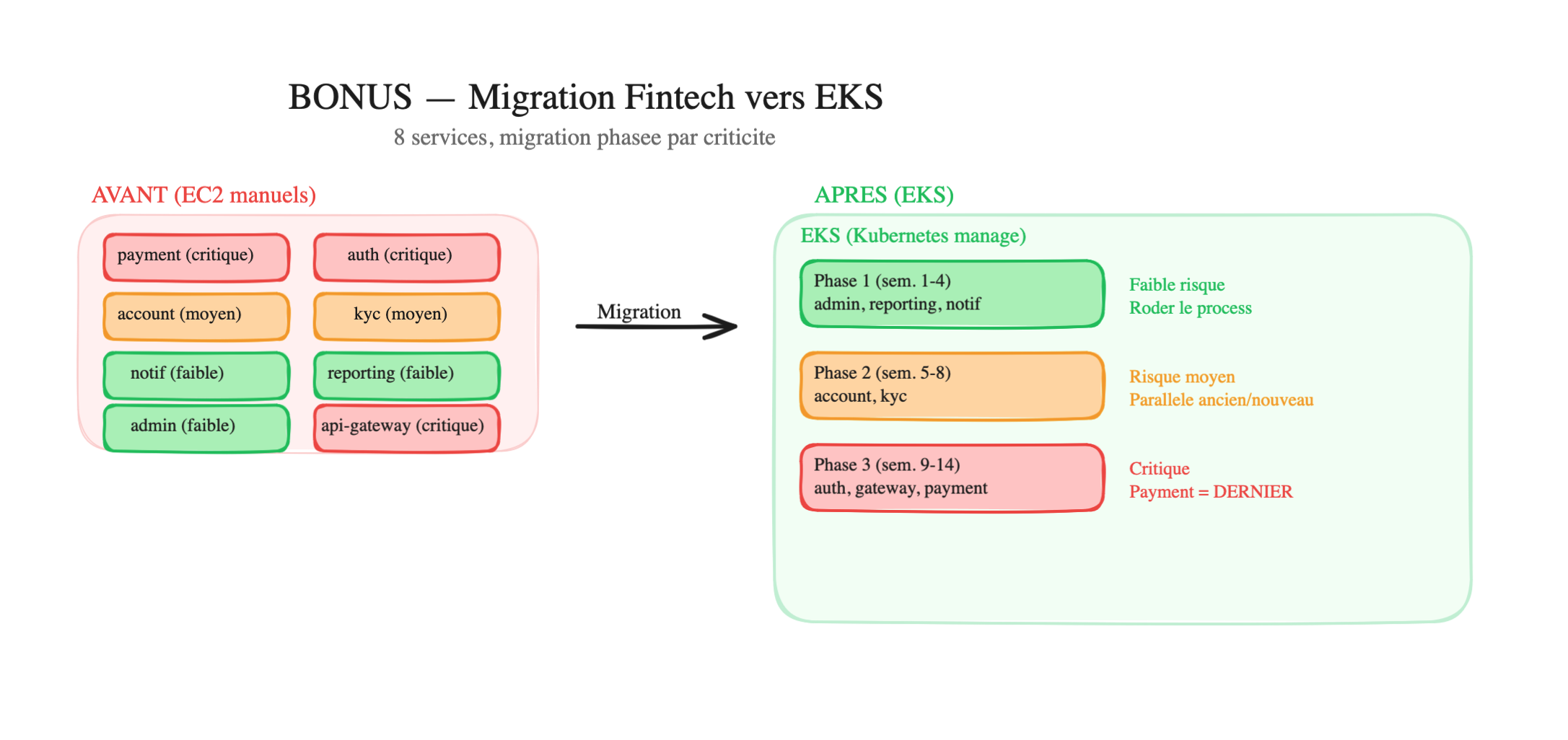
Phase 1 — Low-risk services (weeks 1-4)
admin-dashboard → EKS (if it breaks, only internal support is impacted)reporting-service → EKS (it runs 1x/day, easy to test)notification-service → EKS (a delayed email is not critical)Why start with these:
- If the migration fails, the business impact is nearly zero
- You build your CI/CD pipeline (Dockerfile → build → push ECR → deploy K8s) on a simple case
- You validate monitoring, namespaces, network policies on non-critical services
- The team builds confidence with K8s and the deployment process
Phase 2 — Medium-risk services (weeks 5-8)
account-service → EKSkyc-service → EKS- More traffic, more dependencies between services
- You run the old (EC2) and the new (EKS) in parallel for 1 week
- You compare metrics (response time, error rate) between the two
- If everything looks good → you switch traffic to EKS. If not → rollback to EC2
Phase 3 — Critical services (weeks 9-14)
auth-service → EKS (weeks 9-11)api-gateway → EKS (week 12)payment-service → EKS (weeks 13-14)- Payments are LAST — at this point, you’ve migrated 7 services, you know the process by heart
- Each critical service runs in parallel (old + new) for at least 1 week before switching
- Load tests before switching (simulate normal traffic and spikes)
- Rollback plan documented and tested for each service
- Payment migration on a Tuesday morning (never on a Friday, never during a spike)
- RBAC configured: only senior DevOps can deploy to the payment namespace
What you set up BEFORE starting:
- Standardized CI/CD pipeline (the same for all services)
- Dockerfiles for each service (tested in staging)
- Monitoring + alerts on each migrated service
- Rollback runbook: “if it breaks, here’s how to go back in 5 minutes”
Migration timeline:
Week 1 2 3 4 5 6 7 8 9 10 11 12 13 14 ├─── Phase 1 (low risk) ──────┤ admin reporting notif ├── Phase 2 (medium) ─┤ account kyc ├── Phase 3 (critical) ──┤ auth gateway paymentAlternatives not chosen:
| Alternative | Why not |
|---|---|
| Big bang (migrate everything at once) | If it fails, EVERYTHING is down. Unacceptable for a fintech |
| Start with payments | If the payment migration fails and you haven’t refined the process, it’s catastrophic |
| ECS instead of EKS | Simpler, but no RBAC or native network policies. For a fintech with compliance requirements, K8s is more suitable |
| Migrate everything in parallel | Even with 5 DevOps, 8 migrations at the same time is unmanageable. Quality > speed |
What the recruiter wants to hear:
- You think business first (which service is critical, not which service is technically easy)
- You migrate from least risky to most risky (not the other way around)
- You run old and new in parallel before switching
- You have a rollback plan at each step
- You’re realistic about the team’s capacity (5 DevOps ≠ 8 migrations in parallel)
Architecture BEFORE (the mess on EC2):
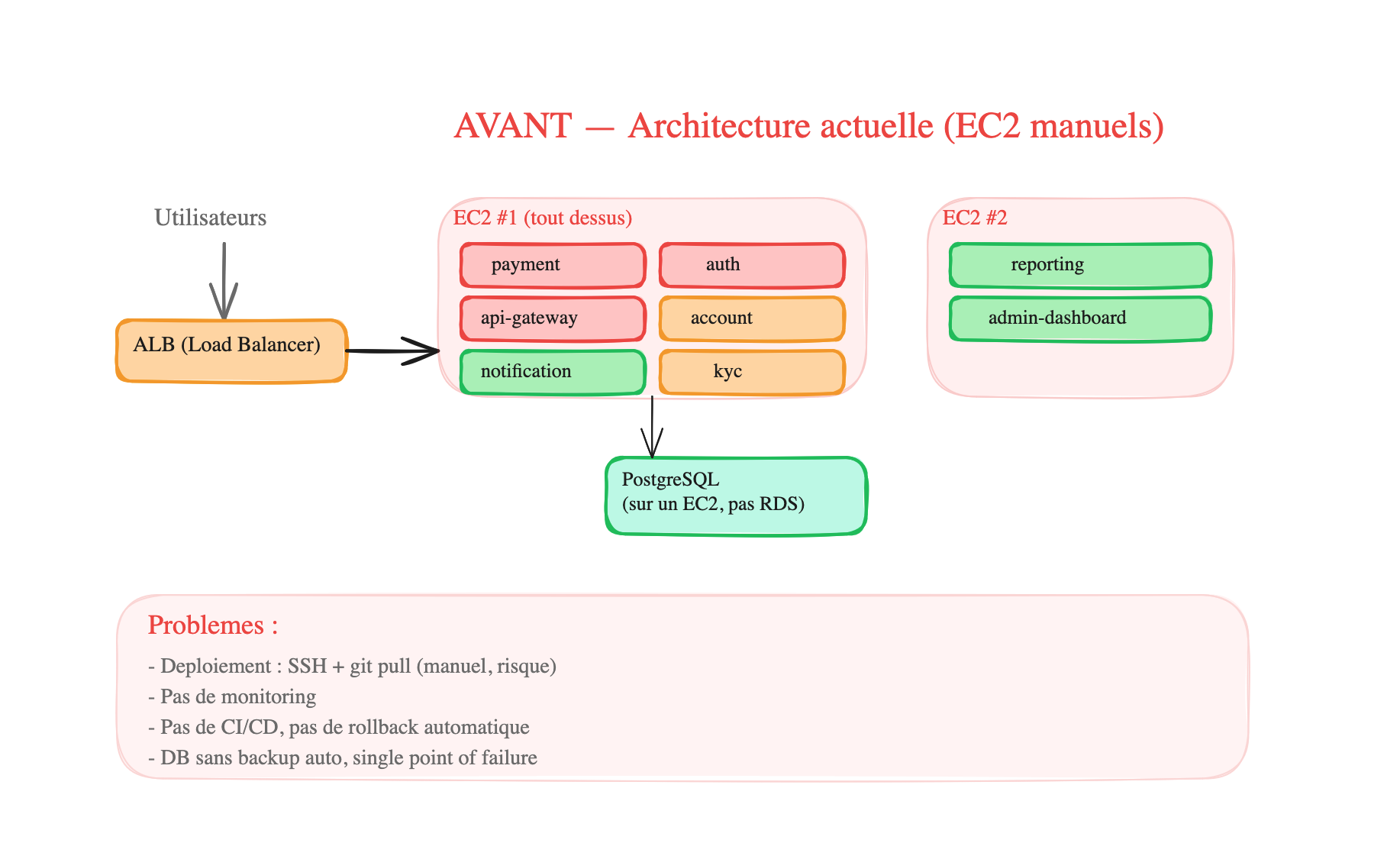
All services are crammed onto 2 EC2s, deployed via SSH + git pull. The DB is on a separate EC2 without automatic backup. No monitoring, no CI/CD, no scaling. If EC2 #1 goes down, 6 services go down at once.
Architecture AFTER (clean on EKS):
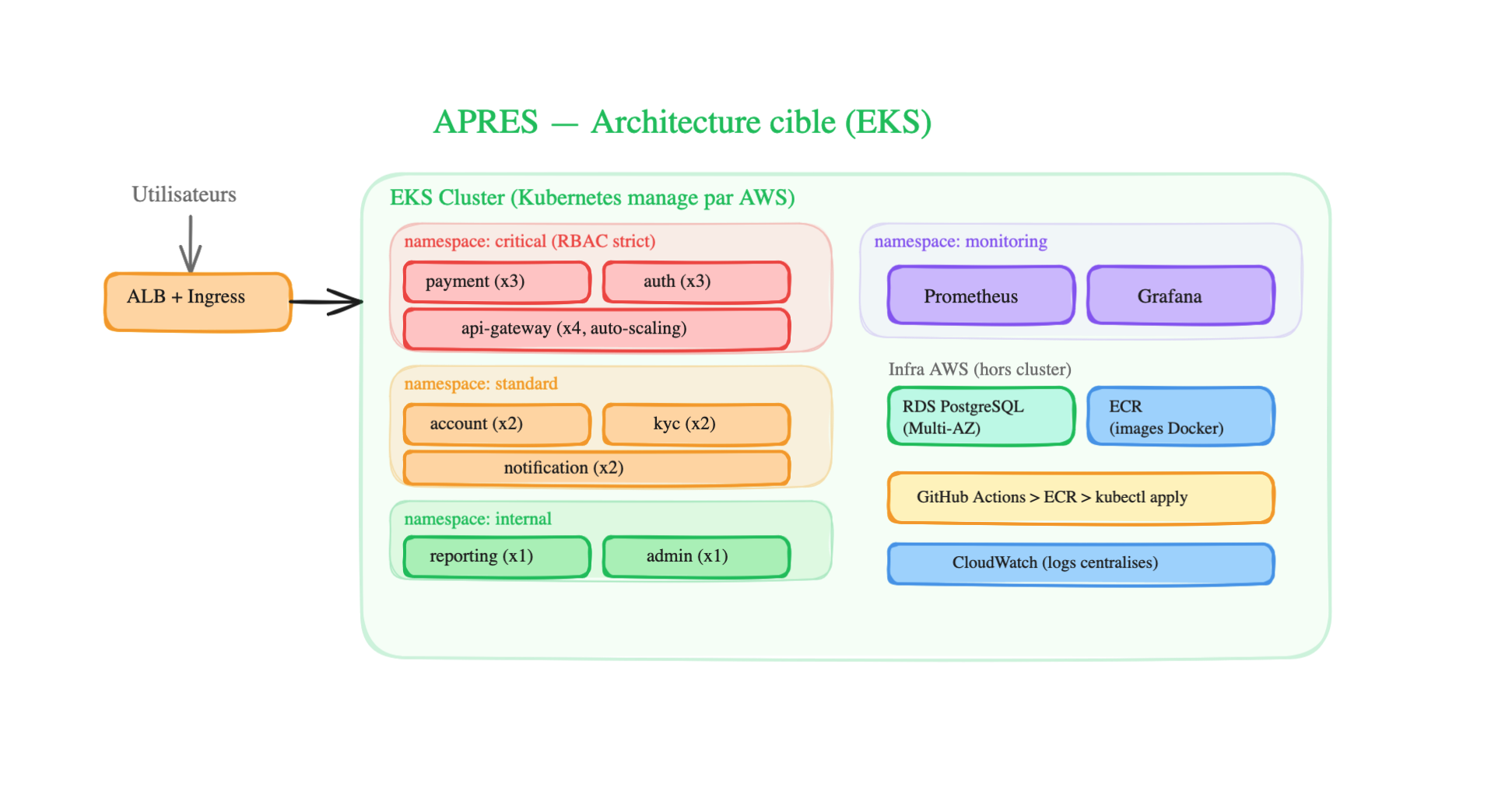
How it’s organized in Kubernetes:
-
4 namespaces that isolate services by criticality:
critical— payment (x3 replicas), auth (x3), api-gateway (x4 with auto-scaling). Strict RBAC: only senior DevOps can deploy in this namespacestandard— account (x2), kyc (x2), notification (x2). Devs can deploy via the CI/CD pipelineinternal— reporting (x1), admin (x1). Low criticality, 1 replica is enoughmonitoring— Prometheus + Grafana monitoring all other namespaces
-
Each service is a Deployment + K8s Service — the Deployment maintains the number of replicas, the Service provides a stable address. If a pod crashes, K8s recreates one automatically.
-
The Ingress Controller (ALB) routes incoming traffic to the right service based on the URL (e.g.:
/api/payment→ payment-service,/api/accounts→ account-service) -
Outside the cluster — the DB is on RDS (managed, Multi-AZ, automatic backups), Docker images are on ECR, CI/CD goes through GitHub Actions → push to ECR →
kubectl applyon EKS, and CloudWatch centralizes logs -
Network Policies — critical services are only accessible from the api-gateway (not directly from outside). The payment service can only communicate with the DB and the api-gateway.
How the migration was actually carried out:
For each migrated service, the process was the same:
- Write the Dockerfile + test it locally
- Create the K8s manifests (Deployment, Service, ConfigMap)
- Add the service to the CI/CD pipeline (GitHub Actions → ECR → kubectl apply)
- Deploy on EKS in parallel with the old EC2 (both running at the same time)
- Progressively route traffic to EKS (via the ALB — weight 10% EKS, 90% EC2, then 50/50, then 100% EKS)
- Monitor metrics for 1 week (compare response times, error rates)
- If everything is good → shut down the old EC2. If there’s a problem → rollback by putting 100% of traffic back on EC2
Migration plan (3 phases):
Recap — Which exercise shows what
Section titled “Recap — Which exercise shows what”| Exercise | Size | Architecture | What it shows |
|---|---|---|---|
| 1. Solo dev | 1 dev, $0 | EC2 + Docker Compose | Sometimes the simple solution is the best |
| 2. Scaling startup | Startup, 500→50k users | ECS Fargate + RDS + SQS | Progressive scaling, webhook decoupling |
| 3. E-commerce Black Friday | Medium company, 40x spikes | ECS auto-scaling + CDN + cache + queue | Handling spikes, cache, queues |
| 4. 15 microservices | Large company, 8 teams | EKS Kubernetes | Standardization, namespace isolation |
| 5. File processing | Variable | Lambda + S3 + SQS (100% serverless) | Event-driven architecture, pay-per-use |
| BONUS. Fintech migration | Large company, 8 services | Phased EKS migration by criticality | Business prioritization, progressive migration |